Case #1: carts replication redesign
That’s the little system redesign case from back in 2023.
We will cover the business need behind the system, how it was redesigned, the results, and things I would probably do differently today.
Let’s start.
When you want to order groceries, you usually browse the delivery app’s catalog, choose products, and add them to your cart.
When you click the «Add» button, the application frontend calls an endpoint in the cart service.
All carts are stored in carts-db, and only the cart service has access to carts-db.
A few years ago, our colleagues needed some information about active carts (carts that had been updated in the last few hours). With that information, they could predict how many orders our users might make in the next few hours (more active carts → more orders) and decide whether the delivery price should be increased (due to high demand, or «surge») or decreased (due to low demand).
Of course, nobody likes to pay a lot for delivery. But from a service point of view, it’s a nice way to leverage the number of orders and make money. Sometimes, you could detect that a user added some products to their cart but didn’t place an order. You could then help the user not forget about their active cart (by sending a notification), which means more orders and more money (let’s call service for that
order-help).
To deliver information about carts from the cart service to other internal clients, the cart-replica service was developed.
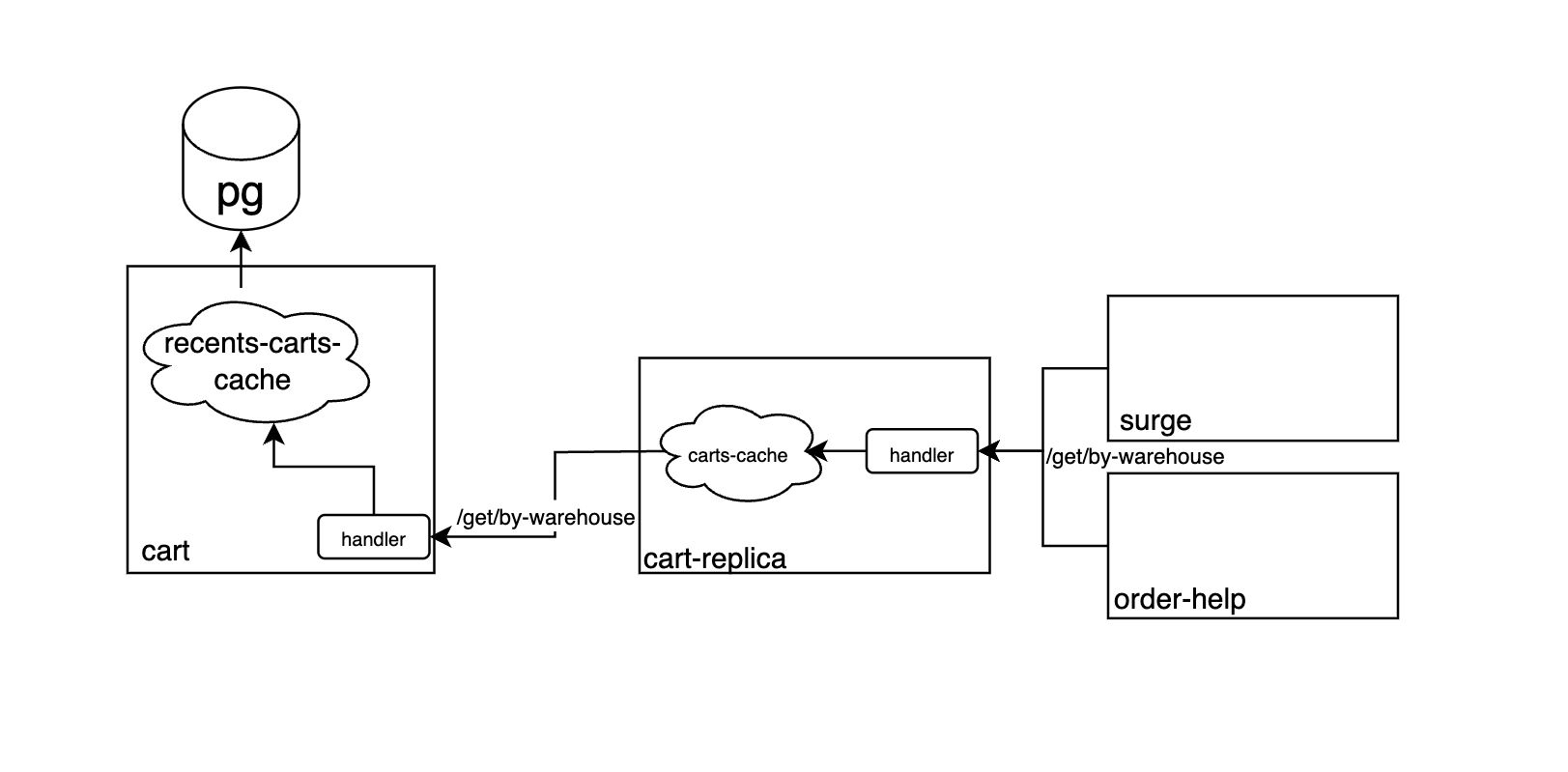
The whole flow looked like this:
Main parts are:
cartservice, which has all the carts incarts-db(marked as pg in the picture). The service has an in-RAM cacherecents-carts-cache(which means that every service machine has its own copy). This cache is updated every few minutes with all the data for all active carts.- The
/get/by-warehouseendpoint returns all the carts for a specific warehouse. - The
cart-replicaservice also has a/get/by-warehouseendpoint, which looks into the LRU cachecarts-cache. If information about carts for a specific warehouse is present incarts-cache, we return it. If not, we querycart/get/by-warehousefor that data, updatecarts-cache, and return the data to the client (surgeororder-help).
A few years later, everything still worked great.
But as the load grew, we started feeling less comfortable with the system.
The number of carts in recents-carts-cache grew tremendously.
Frequent cache updates (for every machine and a huge number of carts) started putting too much load on the network between the service and the database.
And that meant that we couldn’t scale the cart service horizontally!
That’s the problem: our main tool for scaling isn’t available.
Literally a time bomb!
And as a side effect, recents-carts-cache also consumed a huge amount of RAM.
Let’s fix all the problems one by one.
The first problem in our chain is storing large caches in the cart service.
The Change Data Capture pattern can help us solve this problem. The idea behind this approach is that the service making the changes sends all data changes somewhere (usually to a message broker such as Kafka). Consumers of this queue can read the changes and process them in any way they need. Usually, these changes are stored in some kind of log. Sometimes, this can be used to maintain the current state by applying the same changes to a snapshot of the data.
However, we are not actually sending changes. We are simply sending the latest state of the cart. There is less data, and it is simpler to process: we don’t need to know how to «apply» these changes — we just take the most recent state. So in our case, it’s more about Capture than Change in CDC.
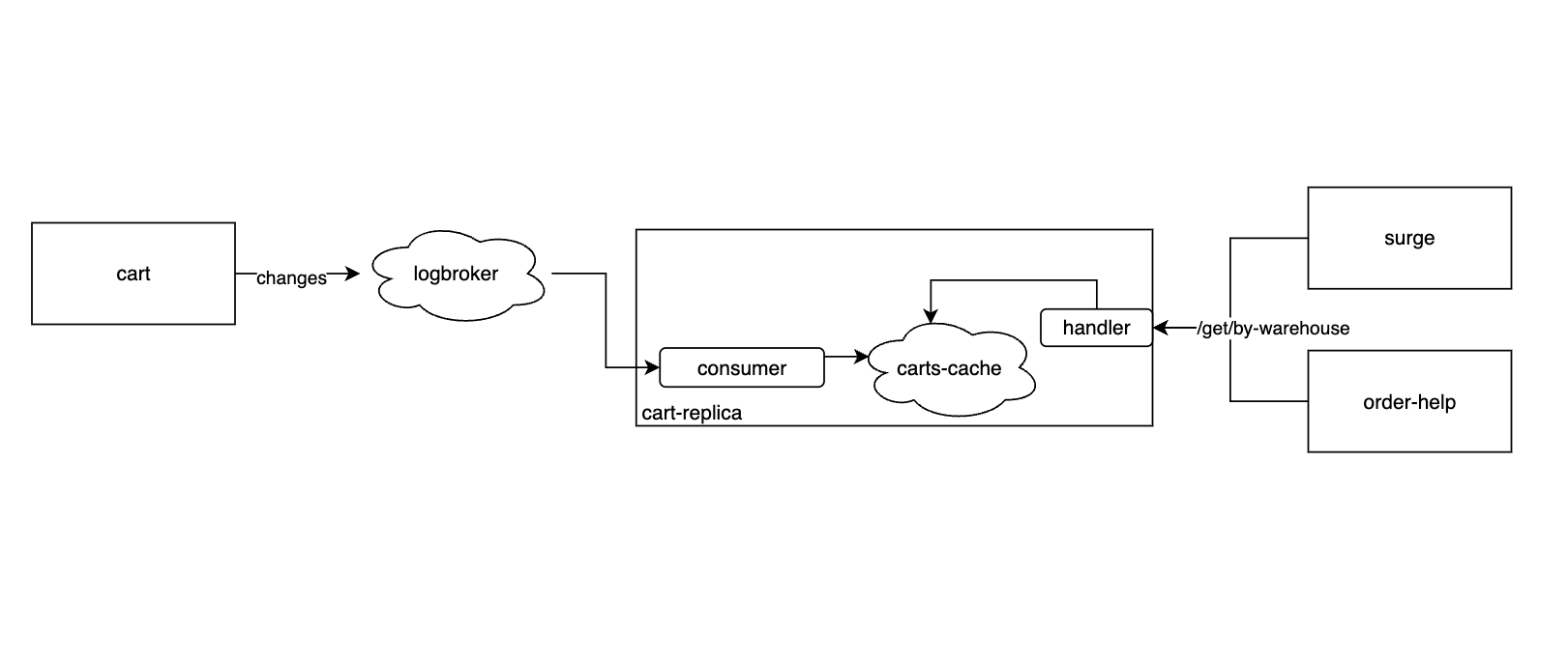
As soon as a new cart is created or an existing cart is updated, the cart service sends an event to Logbroker (our internal equivalent of Kafka, but with some additional features).
A dedicated component of the cart-replica service consumes these events and updates the cache on the machine.
Here we can see the first flaw.
Since consumers read data from different partitions, and different partitions contain different messages, each consumer gets its own unique batch of data.
This means that one pod may consume some messages and put them into its cache, while the other pods won’t get them.
As a result, each cart-replica machine will have an incomplete state in its cache, which will lead to incorrect responses to client services.
So we can’t scale the cart-replica service horizontally anymore, because with this setup, the architecture only works with a single cart-replica machine!
Not what we wanted.
Let’s add a database as a synchronization point:
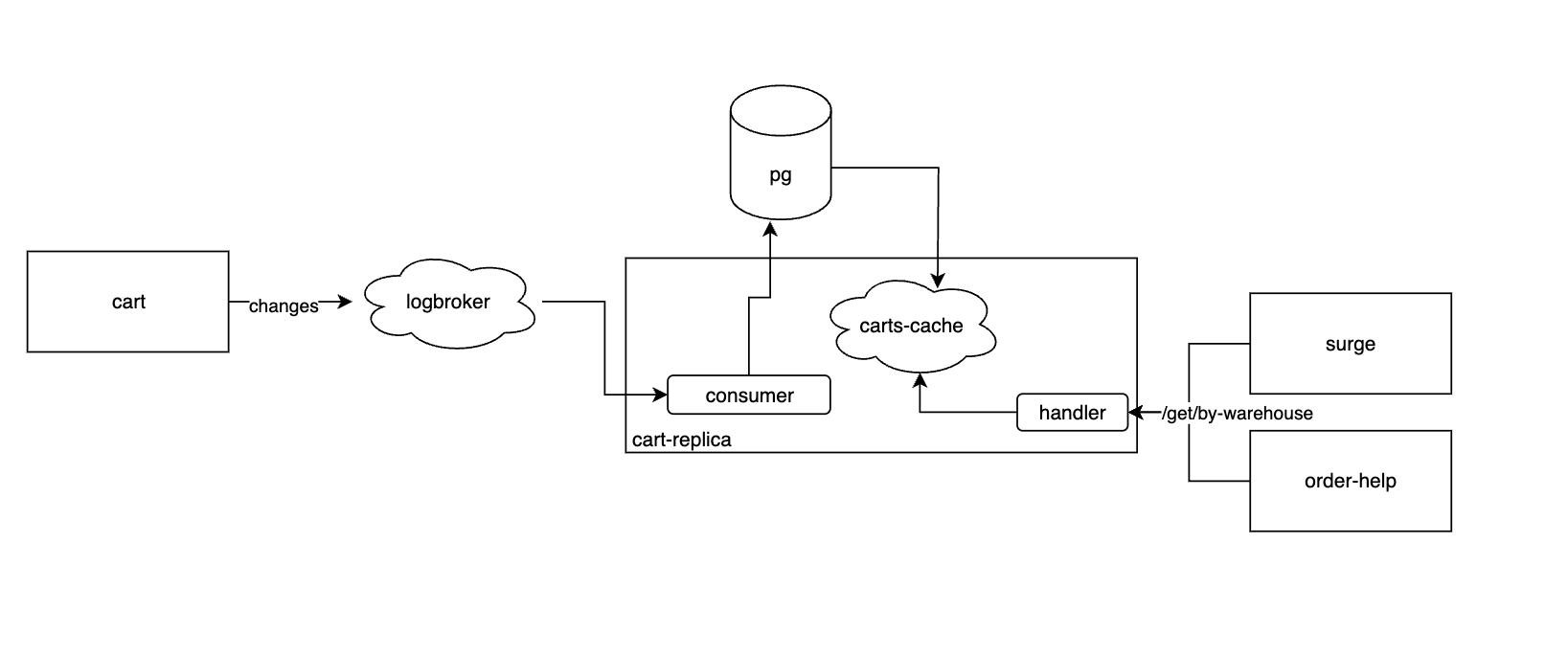
That’s better. Now we have a synchronization point between service machines, which allows us to have a cache backed by the database on each machine and serve data to clients.
But that’s not all!
Reading from Kafka/Logbroker queues is guaranteed to be sequential, which means there are certain limitations on the operations a consumer can perform. For example, if a consumer performs an operation that takes a long time or is likely to fail, the message won’t be processed and will be put back into the queue, after which it will be processed again. As a result, all other messages behind the one being processed will patiently wait for their turn. Problems like these can lead to a backlog of unread data and delays in delivering it to consumers.
In solutions like this, there is an intuitive guideline: keep the data processing done by the consumer lightweight. Writing to a database can potentially be expensive. There may be various indexes that need to be updated. Your queries can also fail because they involve network calls. So we need to simplify this operation by adding an intermediate step.
Let’s add another queue!
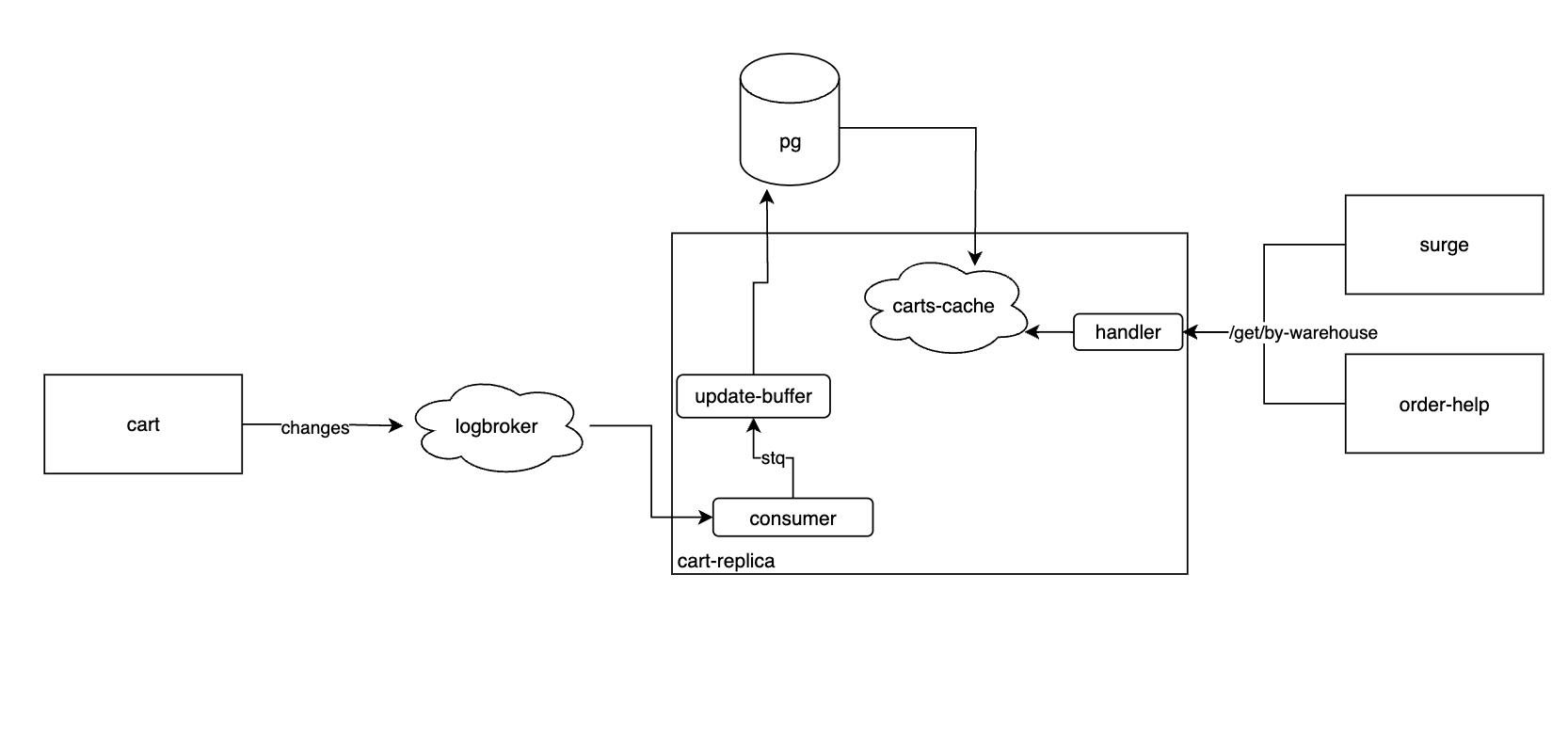
This time, we use STQ (internal equivalent of Amazon SQS). STQ is essentially a pool of tasks that can be processed in parallel.
So, when the consumer puts a data change event into STQ, each service machine can pick up a task and process it. Putting an event into STQ is a relatively lightweight operation. At the same time, STQ does not guarantee the order in which tasks are executed, so we don’t have to worry about these kinds of processing issues.
We also need to take this into account when updating the data in the database. For example, if we first update the state in the database with a newer change and then process a task with an older change, we might overwrite the newer state with the older one. So we need to carefully design the query to prevent this from happening.
This solution is much easier to scale, since STQ can distribute tasks much faster than parallel consumption from Logbroker. There are also no partition-related limitations like those in Logbroker.
Of course, we could have put STQ directly between the cart and cart-replica services, but conceptually, this would introduce tight coupling between the two services and block our scaling point if we ever wanted to add another client consuming data changes from Logbroker.
Different clients (not the same service machines, but separate services) can independently consume the same data from Logbroker, whereas STQ only allows us to put a task into the queue and have one consumer pick it up, after which the task is removed from the queue.
Once the data reaches the database, the cache on each pod picks up the changes (of course, this doesn’t have to be done by reading the entire dataset; we can also use incremental updates). We can then call an endpoint backed by this cache to retrieve the data. The cache stores data from the last couple of hours so that we don’t have to keep a full copy of the data in the database.
Speaking of the database!
We also need to clean it up from time to time to remove stale data. Let’s add some kind of garbage collector that deletes all data older than a certain threshold (we only need data from the last few hours anyway):
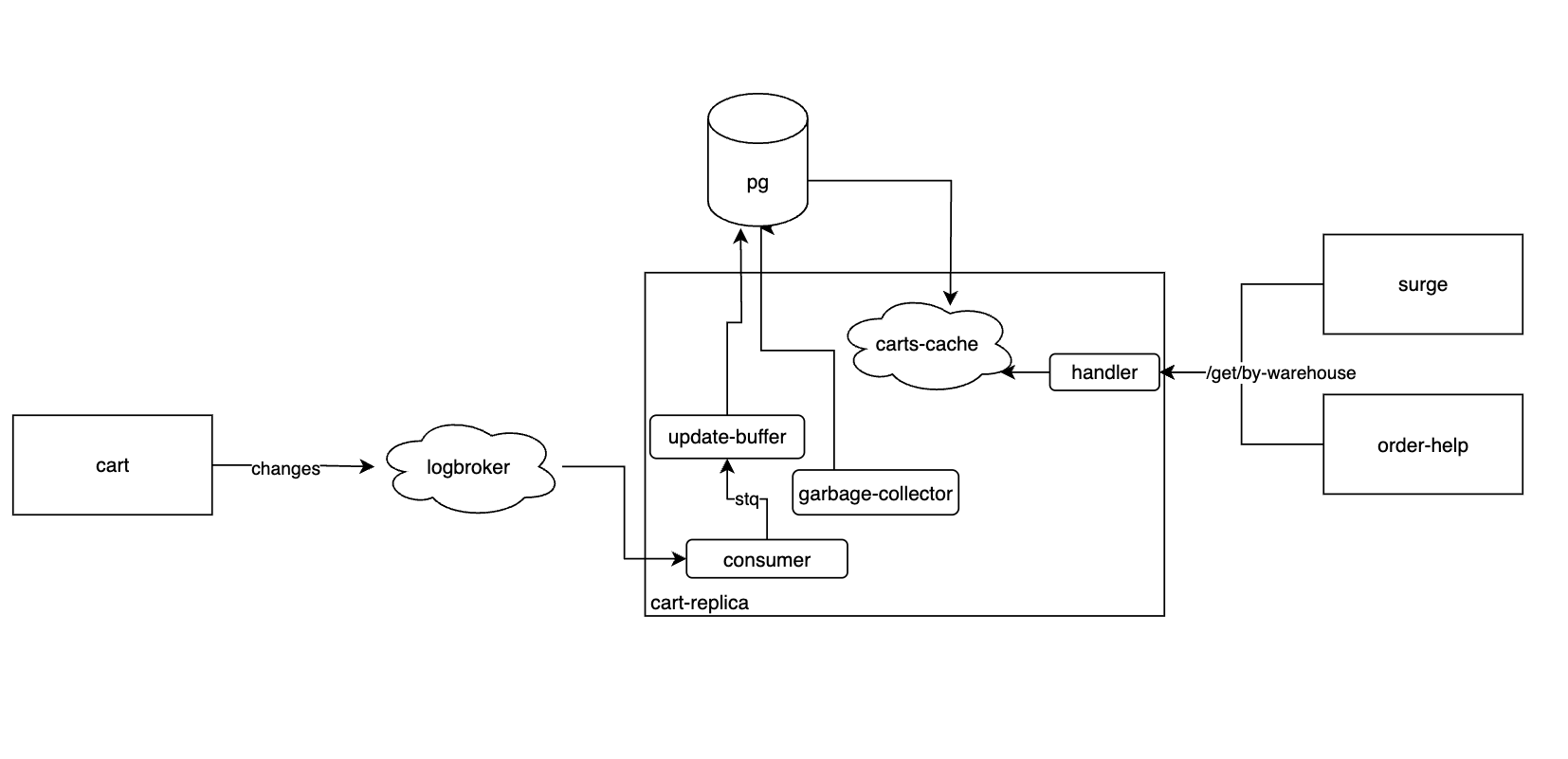
And this is what we ended up with.
So, what did we achieve?
- fixed horizontal scaling for our
cartservice; - reduced the extra load on it, which was needed for internal background tasks but could still affect a service handling constant user traffic;
- reduced RAM usage in
cartby roughly 60% per machine; - made each client roughly 72% faster, since retrieving data no longer requires potentially making calls to another service (and that’s query p99 is around 18ms now);
- removed data that wasn’t used by clients, which allowed us to store less data in
cart-replica.
And it was also my first project where I deliberately optimized something. It was what got me interested in all sorts of optimization and making things more efficient.
What would I do differently today?
First, this two-queue pattern was used quite often at our company and was more or less a «standard solution». It was used so often because interactions always had to happen between services. If you want to write to another service’s database, create an API in the service responsible for it and call that API. If you want to read from it, do the same.
But in general, there are no such restrictions.
For example, if we need all the cart data, we could use Postgres logical replication, which would handle everything out of the box. The solution is much less flexible, but it could be much faster to set up.
Second, at that time I was, for no good reason, a strong advocate of strict schemas. So every field sent from cart was explicitly defined in the schemas, code was generated for them, and there were separate columns for them in the cart-replica database.
Unfortunately, this is a rather inflexible approach.
Every time one of the cart-replica clients needed a new field, we had to add it to:
- the Logbroker event
- the STQ event
- the
cart-replicadatabase - the
cart-replicaAPI
But if the entire cart looked something like this:
cart_id | updated_at | version | data_json
and the required fields were sent based on a dynamic configuration on the cart side, we could have avoided a recurring couple-of-days-long routine task.
Hope you learned something.
I totally did.